dudu-lai
Yes! The temperature controls work perfectly now! Thanks 🙂
On another note, the three airflow mode buttons marked with the red rectangle do not work at all. There is no response when they are pressed. I can still change the airflow modes using the physical button, and when I do, the corresponding airflow mode icons light up. However, I cannot change them using the touchscreen.
Also, at the top, the power button, fan-speed bar, and A/C button are positioned incorrectly, causing the A/C button to overlap the settings button.
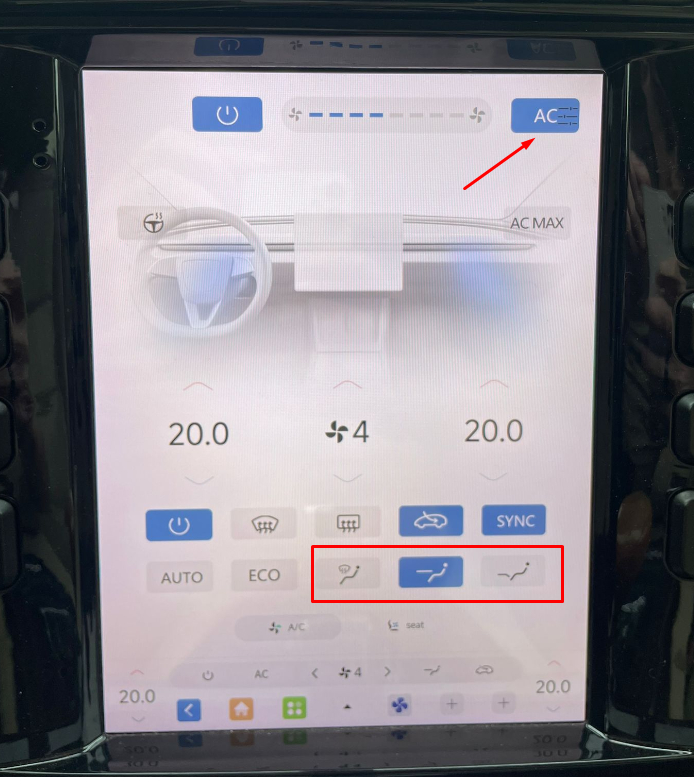
It would also be nice to have an option in the settings to choose which buttons are displayed. For example, I would like to hide the heated steering wheel button because it does not work on the screen and I already have a dedicated physical button for it. I would also like to hide the 'seat' button at the very bottom, as I do not need it in my case either - I also have dedicated physical buttons for the seat heating.
This is just a small suggestion from a user’s perspective. Other than that, DuduOS is really great 🙂


